Secure GPS adds faster Help search, an artificial-intelligence assistant that answers questions about the documentation, invoices delivered automatically by email, and broader text-message coverage. These functions shorten the path from a question to a concrete action for both first-time tracker owners and businesses managing devices, alerts, trips, and payments.
A GPS tracking system brings together hardware, connectivity, maps, alert rules, history, and reports. Many questions therefore require more than an isolated definition: users need to find the right guide, connect it with their situation, and verify the steps. This update organizes that process without replacing human review when technical support or an operational decision is required.
Search Articles in Secure GPS Help
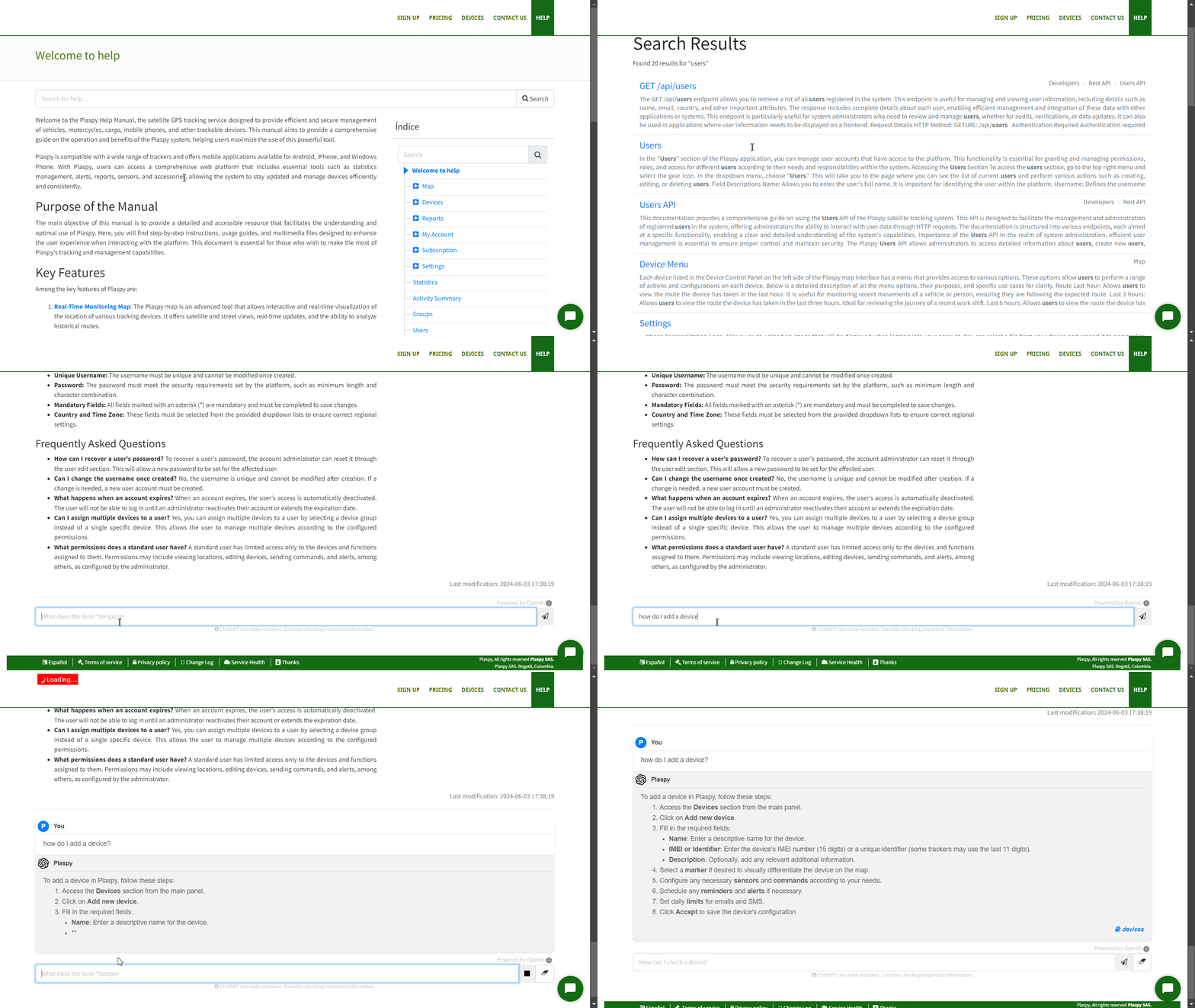
The Help center now includes a dedicated search function. Users can enter a word or phrase and find articles related by title and content instead of manually browsing every category.
The function is designed for concrete queries such as “set up a tracker,” “view route history,” “create an alert,” “share a location,” or “open a report.” Results provide a summary of the matching content and a path to the complete guide.
How does this help customers? It reduces the distance between a problem and the applicable documentation. An installer can reach device setup sooner, a supervisor can find an alert explanation, and a new user can learn a function without already knowing the exact menu name.
For better results:
- combine the function or device name with the action you want to perform;
- try natural alternatives such as “trip,” “route,” or “history”;
- open the full article and confirm that it applies to the model or function being used;
- check the context when a configuration depends on an operator or a specific device.
Start from Secure GPS Help, which explains the platform's main functions.
An AI Assistant for Documentation Questions
In addition to traditional search, Secure GPS adds a conversational artificial-intelligence assistant inside Help. Users can ask a question in their own words and receive an answer built from available documentation articles.
The advantage over a result list is that the assistant can bring related information together and present it as a sequence of steps. For example, when asked about a tracker that is not updating, it can guide the user toward checking the last connection, device setup, and model guide within the documented information.
Answers can include references to the sources used. Those sources let users open the corresponding article, verify details, and continue with the official instructions. Links are presented so that documentation can be consulted without losing the conversation.
The assistant is useful for:
- new users: understand concepts such as device, position, alert, geofence, trip, and report;
- operators: quickly find a procedure for a task that is not performed every day;
- installers: locate documentation related to a brand or model;
- administrators: identify which information should be collected before escalating a case;
- engineers: discover related articles before reviewing a public contract or integration.
Artificial intelligence may interpret a question imperfectly or produce an incomplete answer. For critical setup, security actions, hardware commands, or billing decisions, users should verify the linked source and request assistance when any uncertainty remains.
What a New User Can Do with Help
A first-time Secure GPS user can use search and the assistant to understand the basic GPS tracking workflow:
- Add a device: register the tracker identifier or use a compatible phone.
- Configure transmission: prepare the equipment to send positions to Secure GPS according to its model guide.
- Open the map: view the latest location, time, speed, status, and available data.
- Review history: analyze trips, stops, and events for a selected period.
- Create alerts: define conditions relevant to safety, maintenance, or operations.
- Generate reports: turn positions and events into information that can be compared or shared.
The GPS map guide is a practical starting point for learning how each device's information is presented.
Real-World Search Examples
Help becomes valuable when it connects a question with a decision. The new experience can reduce search time in scenarios such as:
- Vehicle without recent positions: find the connection guide and determine which data support needs to distinguish setup, connectivity, and installation issues.
- Alert received without context: learn what the event means, which data it uses, and how its configuration can be adjusted.
- Route or visit to verify: learn how to select a period, open history, and connect points with times and places.
- Temperature sensor: find how the reading is displayed and what depends on the model and physical calibration.
- Business integration: identify relevant public documentation before designing a position or alert query.
- First payment: understand when an invoice is generated and where its notification should arrive.
These searches also help prospective customers assess whether Secure GPS addresses a specific need before configuring a complete operation.
See the New Help Experience
The following animation is preserved from the original article and shows search and assistance inside the Help center:
Text Messages to More Destinations
Secure GPS expands coverage for text messages sent to numbers beginning with +579. This is relevant in workflows where an account uses SMS to communicate with a compatible number, send an allowed instruction, or complement a notification.
Actual availability depends on the destination, international number format, applicable balance or plan, and operator restrictions. The prefix must be written correctly, and users must confirm that the recipient is authorized to receive the message.
During installation, SMS can be used to send supported commands to the number associated with a tracker. In an operation, it can serve as an additional channel when mobile data or application notifications are not suitable. Content, cost, and delivery depend on the service, and not every device accepts the same commands.
Before sending an instruction, check the model guide in the compatible GPS device catalog. An incorrect command may have no effect or change a setting that must later be restored.
Invoices Delivered Automatically by Email
When Secure GPS generates the invoice associated with a payment, the document can be sent automatically to the user's email address. The notification contains enough information to identify the invoice and lets the user receive it without returning to the platform only to download the file.
This improvement separates two moments that may occur a few minutes apart: payment confirmation and final invoice generation. Delivery takes place once the document is ready, helping avoid incomplete attachments or references that are not yet available.
What is the advantage? A business can provide the document to accounting with fewer steps, an administrator retains payment evidence, and an individual user finds the invoice in the same channel used for other account communications.
In practice:
- the payment must be associated with the correct account;
- the email address must be current and able to receive messages;
- document generation must finish before delivery;
- if the message does not appear, check spam folders and account notifications;
- tax or administrative corrections should be handled through the appropriate support channel.
Available plans and options are listed on Secure GPS pricing and subscriptions.
Additional Validation for Support and Account Protection
The update strengthens validation used by selected support and administration flows. When a messaging interaction requests an action connected with a user, Secure GPS can require a verification code with limited validity before proceeding.
This control helps confirm that the person can access a channel already associated with the account. The code should not be shared with third parties or sent outside a legitimate support conversation. Secure GPS personnel do not need a user's password to provide assistance.
General security and stability improvements were also made to session, request, and data handling. Internal details remain outside this article; the customer benefit is a more protected experience when using Help, messaging, and billing.
How to Combine Search, AI, and Human Support
- Begin with search when you know the function, model, or term you need.
- Use the assistant when the question combines several concepts or needs a step-by-step explanation.
- Open the sources and confirm specific details before sending commands or changing setup.
- Contact support when behavior differs from the documentation, a security risk exists, or account information must be reviewed.
- Provide verifiable context such as the model, event time, expected behavior, and observed example without sharing credentials.
The Secure GPS contact page lists the channels available for a request that cannot be resolved through documentation.
Public Technical Summary
Search queries Help content and presents articles related to the user's expression. The conversational assistant uses published documentation as context, returns structured text, and can display links to the sources supporting the answer.
The billing workflow prepares the final document and sends it by email after generation. Expanded SMS coverage accepts the specified international prefix, subject to availability, format, balance, and compatibility. Sensitive support flows can request a temporary code to validate the user before continuing.
No general GPS device adaptation is required for these improvements. Integrators should treat assistant answers as documentation guidance and use current public contracts when automating positions, alerts, or other functions.
Secure GPS brings GPS tracking, devices, maps, alerts, geofences, history, reports, and account administration together. With easier Help access and automatic document delivery, users can spend less time searching and more time supervising what matters.